Workflows and data API
This is the canonical reference for every HTTP endpoint below /api: authentication,
data queries, downloads, public snapshots, API tokens, workflows, administration, and
onboarding. For a task-oriented introduction and complete Python/Node.js clients, begin
with Using collected data. The application publishes this same file at
/docs/workflows-api; no separate online copy is maintained.
Endpoint index
| Method and path | Authentication | Purpose |
|---|---|---|
GET /api/query |
Session or bearer token | Query sensor rows as JSON. |
GET /api/download |
Session or bearer token | Download original hourly CSV files in a ZIP. |
GET /api/public/station/<uuid>/snapshot |
Station must be public | Read or poll a public dashboard snapshot. |
GET /api/tokens |
Session only | List the current user's API tokens. |
POST /api/tokens |
Session only | Create a token and return its secret once. |
GET /api/tokens/<id> |
Session only | Read token metadata. |
PUT /api/tokens/<id> |
Session only | Replace a token's name and expiry. |
DELETE /api/tokens/<id> |
Session only | Revoke a token. |
GET /api/workflows |
Session or bearer token | List the current user's workflows. |
POST /api/workflows |
Session or bearer token | Create a workflow. |
PUT /api/workflows/<id> |
Session or bearer token | Replace a workflow. |
DELETE /api/workflows/<id> |
Session or bearer token | Delete a workflow. |
GET /api/admin/dashboard |
Administrator session | Read network-health data. |
GET /api/check-username |
Onboarding token | Check a username during onboarding. |
Access and authentication
Data and workflow API endpoints accept either a logged-in web session or an
Authorization: Bearer <token> header. They return 401 when authentication is
missing or invalid and 403 when the account lacks the permission required by the
endpoint or the required station permission. A forced password change also blocks
access.
Administrators implicitly have both global permissions. Other accounts may receive them independently from an administrator:
- Can API permits data queries, downloads, and API-token management;
- Can workflows permits opening the workflow editor and creating, changing, deleting, and running the user's workflows;
- data queries and workflow station nodes still require Browse access;
- ZIP downloads require Download access;
- disabling an account stops its tokens and workflows;
- removing Can API immediately disables its tokens, while removing Can workflows immediately stops its workflows.
A workflow-enabled user does not need Can API when using the browser session. Bearer tokens can only be created and authenticated while their owner has Can API; therefore bearer access to workflow endpoints requires both permissions.
Use a bearer token like this:
curl -H 'Authorization: Bearer snp_REPLACE_WITH_TOKEN' \
  'https://portal.example.org/api/query?station=station-a&limit=100'
Malformed bearer headers and invalid, expired, or revoked credentials return 401.
Missing Can API for data endpoints, missing Can workflows for workflow
endpoints, a forced password change, or missing station rights return 403.
An unknown station returns 404. Validation errors return 400. Routes that call
Flask's standard abort() may return an HTML error body, so clients must use the HTTP
status and must not assume that every error response is JSON.
JSON write requests use Content-Type: application/json. Browser writes are also
subject to the application's same-site Origin/Referer check. Successful JSON
responses may be gzip-compressed when the client sends Accept-Encoding: gzip.
API tokens
Users manage their own tokens at /api-tokens. Token management requires a logged-in
browser session; bearer tokens cannot manage other tokens.
| Method and path | Purpose |
|---|---|
GET /api/tokens |
List the current user's tokens. |
GET /api/tokens/<id> |
Read one token's metadata. |
POST /api/tokens |
Create a token. |
PUT /api/tokens/<id> |
Change its name or expiry. |
DELETE /api/tokens/<id> |
Revoke it immediately. |
Create or update bodies use a name and an optional future ISO-8601 expiry:
{"name": "Exporter", "expires_at": "2026-12-31T23:59:59Z"}
The complete secret is returned only by POST, so copy it immediately. Later reads
show only its prefix and metadata. The database stores a SHA-256 hash, not the token.
Tokens always inherit their owner's current account and station permissions.
POST /api/tokens returns 201 and is the only response that contains the complete
token secret. List, get, and update responses contain only metadata:
{
  "id": 12,
  "username": "alice",
  "name": "Exporter",
  "token_prefix": "snp_abcd1234",
  "created_at": "2026-10-16T08:00:00Z",
  "updated_at": "2026-10-16T08:00:00Z",
  "last_used_at": null,
  "expires_at": "2026-12-31T23:59:59Z"
}
GET /api/tokens wraps these objects in {"tokens": [...]}. A token name is required
and may contain at most 100 characters. An expiry, when supplied, must be a future
ISO-8601 timestamp. Send null or an empty expiry on PUT to remove it. DELETE
returns 204 with no body. A missing token or a token owned by somebody else returns
404.
Query API
GET /api/query reads rows from one or more stations:
GET /api/query?station=station-a,station-b&from=2026-10-15T00:00:00Z&to=2026-10-15T12:00:00Z&fields=RainRate,TempOut&limit=1000
| Parameter | Required | Meaning |
|---|---|---|
station |
yes | One station UUID or a comma-separated list. |
from |
no | Inclusive ISO-8601 lower time bound. |
to |
no | Inclusive ISO-8601 upper time bound; it cannot precede from. |
fields |
no | Comma-separated fields to return. The timestamp is retained. |
limit |
no | Rows per station; default 1,000, clamped to 1–10,000. |
Timestamps without an offset are interpreted as UTC. Results are ordered by time and grouped by station. CSV values remain JSON strings, matching their stored form:
{
  "from": "2026-10-15T00:00:00Z",
  "to": "2026-10-15T12:00:00Z",
  "stations": [
    {
      "station": "station-a",
      "rows": [
        {"timestamp": "2026-10-15T11:59:00Z", "RainRate": "301.2"}
      ]
    }
  ]
}
station is required. Every requested station must exist and the caller must have
Browse access to all of them; otherwise the complete request fails. Duplicate station
and field names are removed. Requested fields that are absent from a row are omitted.
A recognized station with no matching observations has an empty rows array.
Download API
GET /api/download?station=<uuid>[,<uuid>]&from=<ISO>&to=<ISO> returns a ZIP containing
the original hourly CSV files. from and to are optional UTC ISO-8601 bounds.
Unlike the query API, a download includes each original hourly file that overlaps the
requested interval. Boundary files are not rewritten to remove individual rows.
The caller needs Download access to every requested station. A successful response is
an attachment named sensor-data.zip; 404 is returned when no files overlap the
interval.
Public station snapshot API
GET /api/public/station/<uuid>/snapshot supplies the public station dashboard. It
requires no login, but the station must be public. Unknown and non-public stations both
return 404 so the route does not reveal private station names.
| Parameter | Required | Meaning |
|---|---|---|
window |
no | Dashboard interval, normalized to a supported public window; default hour. |
since |
no | The last_timestamp already held by the client. |
force |
no | Boolean-like value; when true, rebuild and return the snapshot. |
An initial request, a changed reading, or force=1 returns:
{
  "changed": true,
  "snapshot": {
    "instrument_uuid": "station-a",
    "station_name": "Roof Station",
    "last_timestamp": "2026-10-16T10:00:00Z",
    "rows": 60,
    "window": "hour",
    "window_start": "2026-10-16T09:00:00Z",
    "window_end": "2026-10-16T10:00:00Z",
    "location": {"latitude": "40.821", "longitude": "14.426"},
    "cards": [
      {"key": "temperature", "label": "Temperature", "value": 18.4, "unit": "°C"}
    ],
    "series": [],
    "aqi_status": null
  }
}
Cards and chart series depend on the station's fields and chart configuration. To poll
cheaply, pass the previous snapshot's timestamp as since. If the newest stored row is
unchanged, the response is only {"changed": false}. A public station without readable
observations returns an empty snapshot with last_timestamp: null, empty cards and
series, and zero rows.
Workflow management API
Users can manage only their own workflows:
| Method and path | Purpose |
|---|---|
GET /api/workflows |
List workflows. |
POST /api/workflows |
Create a workflow. |
PUT /api/workflows/<id> |
Replace a workflow. |
DELETE /api/workflows/<id> |
Delete a workflow and its saved firing state. |
Create and update bodies have this shape:
{
  "name": "Extreme rain email",
  "enabled": true,
  "graph": {
    "nodes": [
      {
        "id": "rain",
        "type": "station",
        "x": 40,
        "y": 80,
        "data": {"station": "station-a"}
      },
      {
        "id": "heavy",
        "type": "condition",
        "x": 280,
        "y": 80,
        "data": {"field": "RainRate", "operator": ">", "value": 300}
      },
      {
        "id": "notify",
        "type": "email",
        "x": 520,
        "y": 80,
        "data": {"recipient": "alerts@example.org"}
      }
    ],
    "edges": [
      {"source": "rain", "target": "heavy"},
      {"source": "heavy", "target": "notify"}
    ]
  }
}
Creation returns 201; listing returns {"workflows": [...]}; replacement returns the
updated workflow; deletion returns 204 with no body. Stored objects also expose id,
username, created_at, updated_at, last_run_at, and last_error. A missing
workflow or one owned by another user returns 404.
Building a workflow
Open /workflows and connect the supported nodes in this order:
Station input -> Numeric condition -> Send email
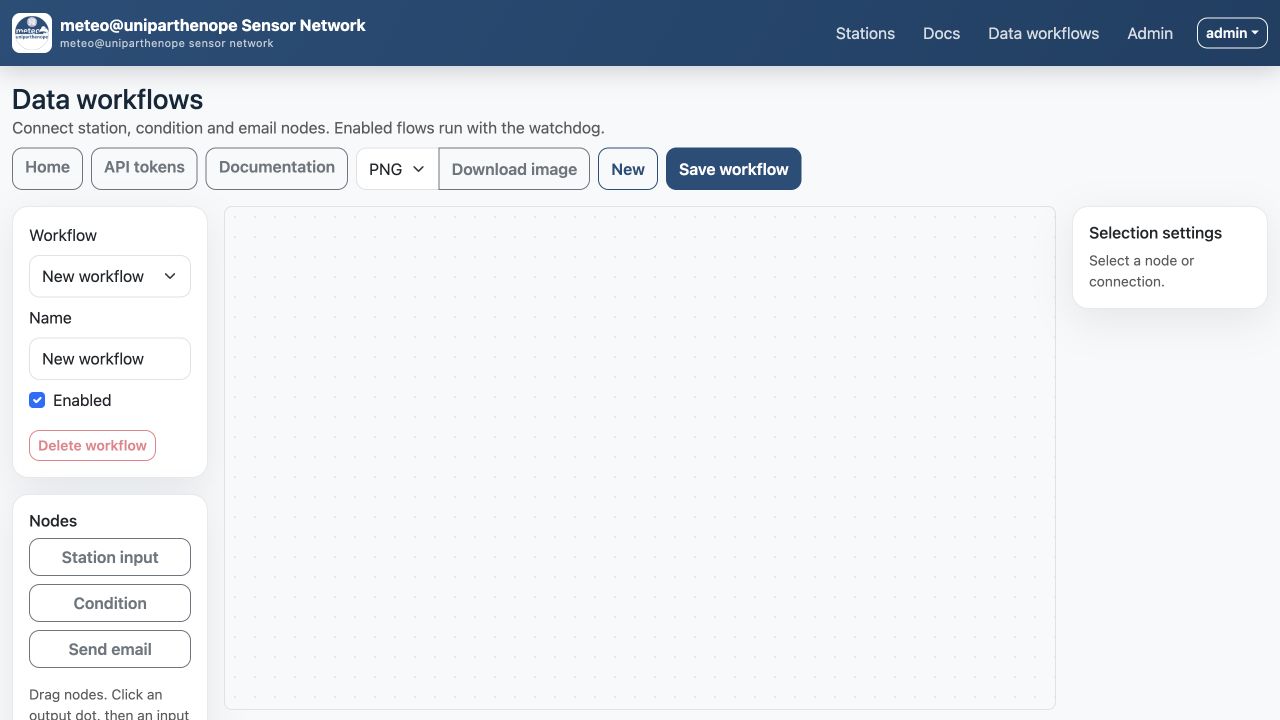
Figure 1. The browser workflow editor. Its constrained node catalogue makes the graph auditable and prevents arbitrary browser-authored code execution.
For example, connect station-a to RainRate > 300, then connect the condition to
an email recipient. The editor can export the graph as SVG, PNG, or JPG; raster images
are rendered at 2× resolution.
The intentionally restricted catalogue accepts no arbitrary code, HTTP requests, shell commands, or custom nodes. Validation rules are:
- node IDs must be unique;
- graphs contain 1–50 nodes and at most 100 edges;
- station nodes must identify stations the owner can browse;
- conditions require a field, a numeric value, and one of
>,>=,<,<=,==, or!=; - each condition needs at least one station input;
- each email node needs at least one condition input and a valid recipient;
- connections may only implement Station → Condition → Email.
Several stations may feed one condition. It is active when any connected station's newest reading satisfies the comparison. Several conditions may also feed one email.
How workflow execution works
Enabled workflows are evaluated by the watchdog, not by a browser request or a Gunicorn worker. Each scan performs the following steps:
- Select every enabled workflow.
- Verify that its owner is active and still has Can workflows (or is an administrator).
- Verify Browse access to every referenced station.
- Load the newest stored CSV row for each station node.
- Convert the selected field to a number and evaluate each condition.
- Compare each condition with its state from the previous scan.
- Send connected emails for conditions that changed from false to true.
- Persist the new condition state,
last_run_at, and anylast_error.
Email delivery is edge-triggered. If a value remains above a threshold for five scans, only the first scan sends an email. The condition must become false before a later false-to-true change can send another email. With multiple station inputs, this transition applies to their aggregate state: the email fires when the condition changes from no matching stations to at least one matching station.
If several newly true conditions feed the same email node during one scan, that node sends one message describing all of those conditions. A failed email is not recorded as successfully fired.
The watchdog interval is configured by watchdogIntervalSec (minimum 10 seconds,
default 60). Run exactly one watchdog process:
# Development server and watchdog
python main.py --config config.json

# Dedicated production watchdog
python main.py --config config.json --watchdog-only
Gunicorn workers serve the web application but do not run the watchdog. Multiple watchdogs can evaluate the same transition and cause duplicate email messages.
Diagnosing a workflow
GET /api/workflows exposes last_run_at and last_error. If a workflow does not
send email, check that:
- it is enabled;
- exactly one watchdog is running;
- its owner is active, has Can workflows, and can browse every referenced station;
- the newest stored row contains a numeric value for the configured field;
- SMTP is configured and working;
- the condition actually changed from false to true rather than remaining true.
Changing or deleting a workflow is restricted to its owner, including when the caller is an administrator.
Administrator network dashboard API
GET /api/admin/dashboard requires a logged-in administrator; bearer credentials are
not accepted. It evaluates up to 500 recent rows for each station and returns the data
used by the administration dashboard:
{
  "updatedAt": "2026-10-16T10:15:00Z",
  "valueColumns": ["Humidity", "TempOut"],
  "stations": [
    {
      "uuid": "station-a",
      "name": "Roof Station",
      "lastTimestamp": "2026-10-16T10:14:00Z",
      "ageSeconds": 60,
      "usualUpdateSeconds": 60,
      "failureThresholdSeconds": 120,
      "status": "OK",
      "alarms": [],
      "batteryInfo": "battery_voltage=4.1",
      "missingFields": [],
      "missingCount": 0,
      "values": {"TempOut": "18.4", "Humidity": "72"}
    }
  ]
}
status is OK or ALARM. Alarm strings identify lost connectivity, low batteries,
too few numeric values, or missing expected fields. Alarmed stations sort first. This
route reads across the storage tree and should be polled conservatively.
Onboarding username API
GET /api/check-username?token=<onboarding-token>&username=<candidate> is intended only
for the account-completion form. A valid, unexpired onboarding token is required to
prevent anonymous username enumeration. An invalid token returns 403.
The response is one of:
{"available": true, "message": ""}
{"available": false, "message": "Username already exists"}
A missing candidate returns {"available": false, "message": "Username is required"}.
docs/workflows-api.md.